The short version
- Forge's engine reads
.msyntax and implements the same core semantics as Octave. - Most Octave scripts run unchanged. Numerical results should match within floating-point tolerance.
- Forge is 15x faster than Octave on eigenvalues, 12x on SVD, near parity on matrix multiply, 1.5-2x slower on FFT.
- Forge ships 29 toolboxes and 817 functions covering Octave's core plus a broader set of domain toolboxes (signal processing, controls, optimization, statistics, finite elements, and more).
- If a script breaks, file an issue at our GitHub.
Installation
If you already have Python, install Forge with one command:
pip install --extra-index-url https://thecommons.cc/pypi/ --trusted-host thecommons.cc forge-ideLaunch with forge or python -m forge.
For the Pro IDE with integrated debugger and LSP, purchase at /products then download from your dashboard.
What works identically
Basic array operations look the same: A = rand(100,100), A * B, A', A \ b. No changes needed.
Plotting calls are a direct match: plot(x,y), figure, subplot, hold on, xlabel, ylabel, legend. Figures render through Matplotlib but the API is unchanged.
Signal processing is covered end to end: fft(), butter(), filter(), filtfilt(), freqz(), spectrogram().
Control systems toolbox functions all map across: tf(), ss(), pid(), step(), bode(), margin(), pidtune().
Linear algebra workhorses: eig(), svd(), chol(), lu(), qr(), inv(), pinv(). Same signatures, same return conventions.
Statistics: mean(), std(), var(), median(), hist(), corrcoef().
Optimization: fminsearch(), fminunc(), lsqnonneg(), linprog().
What's different
Strings
Forge is stricter about the string vs char array distinction than classic Octave. Prefer double-quoted strings ("hello") over single-quoted char arrays ('hello') when in doubt. If you have Octave code that silently treated them as interchangeable, expect a small number of explicit errors to surface.
Anonymous functions capturing workspace variables
Forge captures values at function-definition time, not Octave's historical lazy capture. Rarely a practical issue, but if you have code that rebinds a captured variable after defining an anonymous function and expects the anonymous function to see the new value, it won't.
Cell arrays
Full support, same syntax as Octave. c = {1, 'two', [3 4]}, c{1}, c(1:2) all work as expected.
Struct arrays
Full support. Dynamic field access via s.(name) works. fieldnames(), isfield(), rmfield(), orderfields() are all present.
File I/O
load(), save(), csvread(), dlmread(), fprintf(), and the fopen()/fclose()/fread()/fwrite() family all work. Forge adds modern alternatives you may not have in older Octave: readtable(), writetable(), jsondecode(), jsonencode().
Packages vs toolboxes
In Octave you run pkg install control and pkg load control. In Forge, all 29 toolboxes ship with the install. No package management required, no load calls at the top of your scripts.
Global variables
Same global keyword, same semantics. If your script relies on globals shared across functions, it ports directly.
Plotting backends
Forge uses Matplotlib under a translation layer. Interactive zoom and pan work. Saving figures uses the familiar calls: saveas(gcf, 'plot.png') or print -dpng plot.png. Most Octave plotting patterns work unchanged, including hold on, multiple axes via subplot, and legend placement.
Things Forge has that Octave doesn't
- A Python bridge - call Forge from Python and Python from Forge in the same process.
- Native modern plotting via Matplotlib, without the gnuplot/FLTK backend hassles.
- MKL-accelerated linear algebra on Windows.
- An integrated debugger in the Pro IDE with breakpoints, step-in, and variable inspection.
- Built-in LSP for editor integration (VS Code, Neovim, Emacs).
Things Octave has that Forge doesn't (yet)
An honest list:
- Octave's
eval()supports some esoteric patterns Forge doesn't match. If your scripts dynamically build andevallarge code strings, test first. - Some less-common toolboxes differ. The
symbolicpackage is an example - Forge uses SymPy directly rather than Octave's symbolic wrapper, so the API shape is close but not identical. - Octave's
forge://packages (confusingly also named Forge, no relation to us) - Forge IDE does not currently install Octave's forge packages. We're working on compatibility. - Several obscure numerical routines from old toolboxes. If you hit one, file an issue.
Running your existing scripts
- Point Forge at your
.mfiles directory. - Run
forge script_nameor open the script in the IDE and press Run. - If something breaks, most failures are one of: (a) Forge is stricter about string/char, (b) a specific function is missing, (c) floating-point tolerance difference (expected).
- The error messages tell you exactly what went wrong. No silent failures.
A side-by-side example
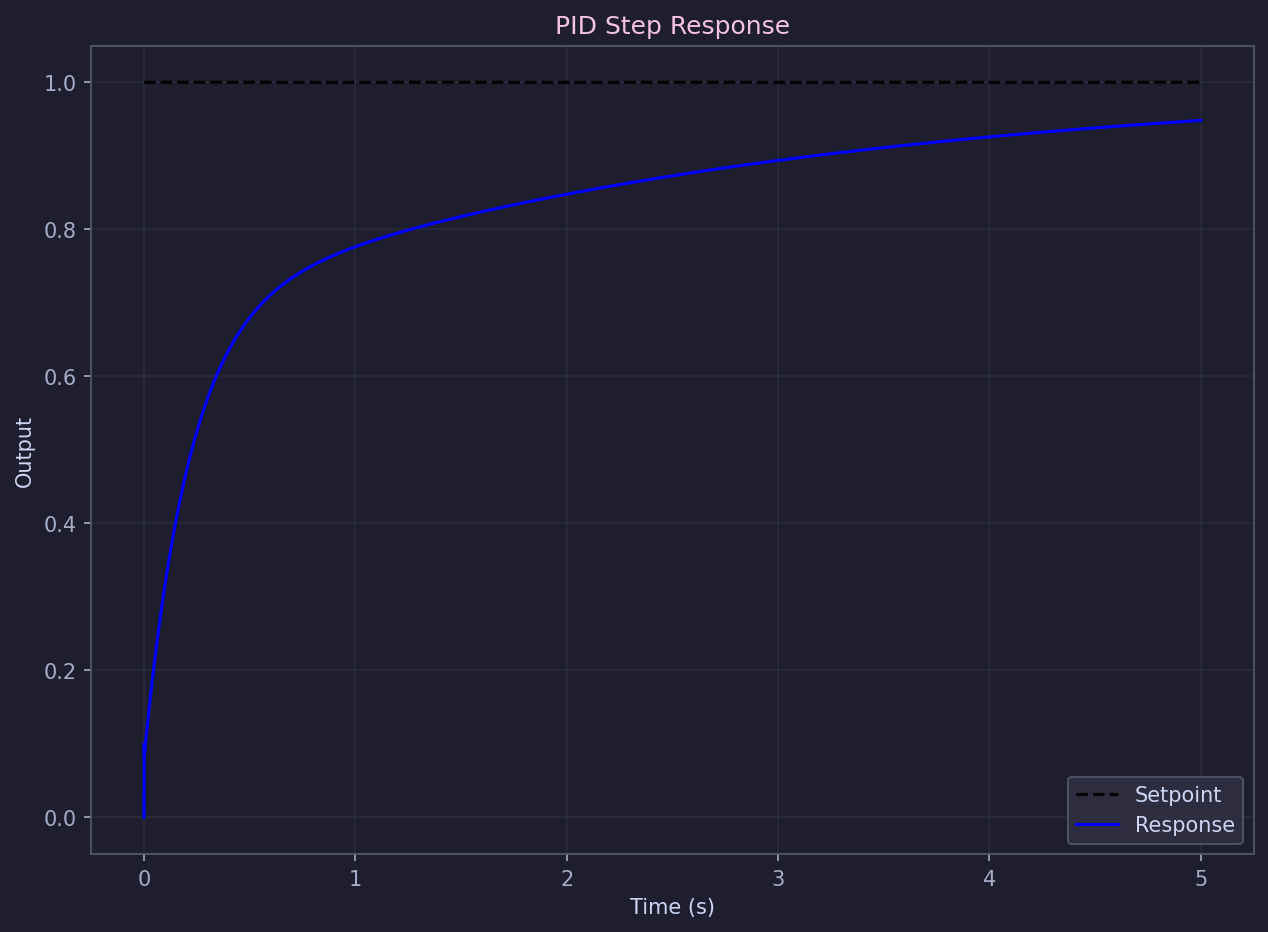
Here is a PID tuning example that runs identically under Octave (with pkg load control) and Forge (no package load needed):
% Define the plant: first-order with 10s time constant
G = tf([1], [10 1]);

% Design a PID controller
C = pid(2, 0.5, 0.1);

% Closed-loop transfer function
T = feedback(C*G, 1);

% Analyze the step response
step(T);
info = stepinfo(T);
fprintf('Rise time: %.2f s\n', info.RiseTime);
fprintf('Overshoot: %.1f%%\n', info.Overshoot);
Same code, same numerical answers within tolerance. Forge produces the step response plot below:
Performance
On a standard benchmark suite Forge is 15x faster than Octave on eigenvalue decomposition, 12x faster on SVD, near parity on dense matrix multiply, and 1.5-2x slower on FFT. The full benchmark, with hardware details and script sources, is at /forge#benchmarks.
The short explanation: Forge uses MKL-backed LAPACK and OpenBLAS paths for dense linear algebra, which is where most scientific workloads spend their time. Octave's FFT is faster because it links against a more aggressively tuned FFTW build by default - we're closing that gap.
Getting help
- Function reference at /forge/reference.
- Tutorials: /forge/tutorial-filter, /forge/tutorial-pid.
- Email info@thecommons.cc for migration questions.
- File bugs at our GitHub.
Ready to try?
Install Forge and point it at one of your existing .m scripts. The CLI engine is free; the Pro IDE with integrated debugger is $29. See /products and /pricing.